

How It Works
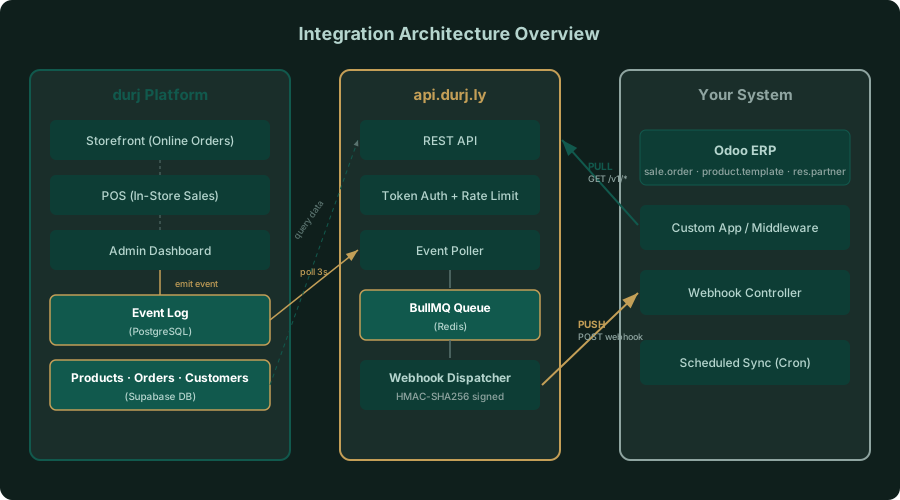
Architecture Overview
The integration system provides two ways to sync your store data with external systems like Odoo:
- Pull: Your system requests data from the REST API
- Push: durj sends real-time notifications via Webhooks
Key Components
| Component | Description |
|---|---|
| REST API | api.durj.ly/api/v1/* — fetch products, orders, customers, inventory |
| Event Log | Every data change is recorded in PostgreSQL |
| Event Poller | Checks the event log every 3 seconds, enqueues to BullMQ |
| BullMQ Queue | Redis-backed job queue for reliable delivery |
| Webhook Dispatcher | Signs payload with HMAC-SHA256, POSTs to your endpoint |
Webhook Delivery Flow
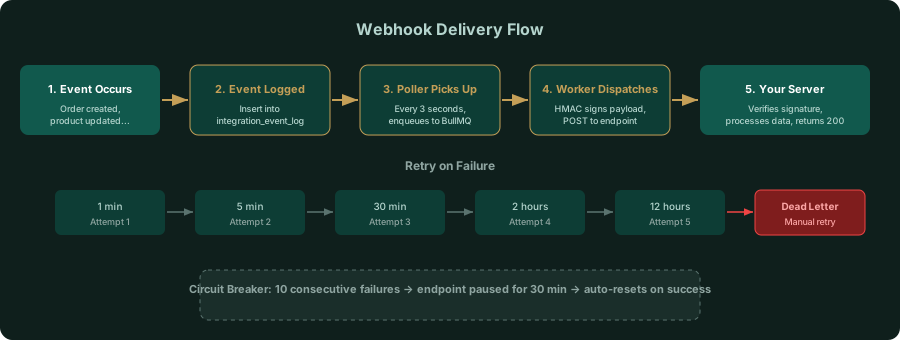
When an event occurs in your store (new order, product update…), here’s what happens:
Retry Policy
| Attempt | Delay |
|---|---|
| 1st retry | 1 minute |
| 2nd retry | 5 minutes |
| 3rd retry | 30 minutes |
| 4th retry | 2 hours |
| 5th retry | 12 hours |
After 5 failed attempts, the delivery moves to the Dead Letter Queue (DLQ) and can be manually retried from the admin dashboard.
Circuit Breaker
If an endpoint fails 10 consecutive times, it’s automatically paused for 30 minutes to protect your server. It auto-resets on the first successful delivery.
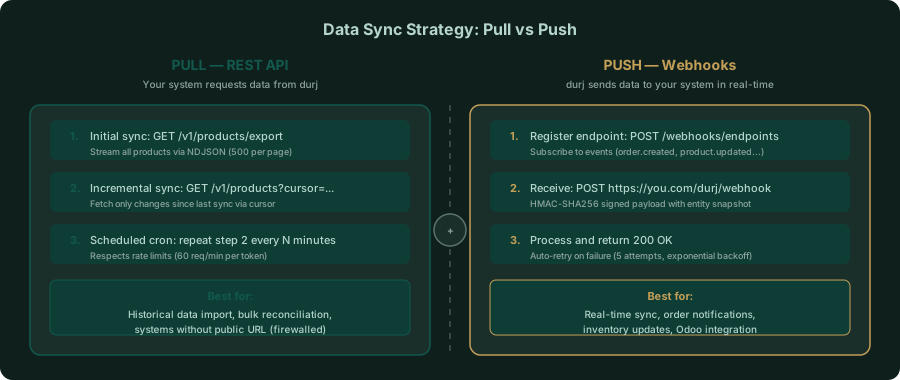
Sync Strategy: Pull vs Push
Best Approach: Combine Both
- Initial sync — Use Pull to import historical data via bulk export endpoints (
/export) - Ongoing sync — Use Push (Webhooks) to receive updates in real-time
- Periodic reconciliation — Schedule a Pull job hourly to catch any missed events
# Example: Initial product synccurl -H "Authorization: Bearer tjr_..." \  "https://api.durj.ly/api/v1/products/export" \  -o products.ndjson
# Then rely on Webhooks for real-time updates